
The good news is that if you’re not a Spectora user, you don’t have to buy it to do this. It works like this:
- You sign up for the free trial version of Spectora at their website. No cost, no obligation.
- You purchase my Spectora TREC 7-6 template (you will actually receive my 7-6 template and my conventional template at no extra charge).
- Email me to notify me of your purchase (for faster service) kenton@internachi.org
- I will share the template with you through Spectora’s server. Open your copy of Spectora…
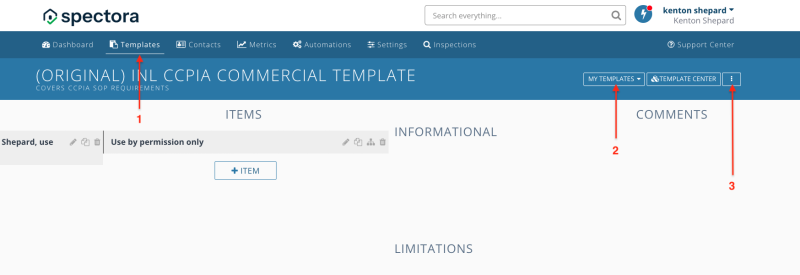
- Select the Templates choice;
- Open “My Templates” and select the template you purchAsed from me. The title will xstart with “(Original)…”;
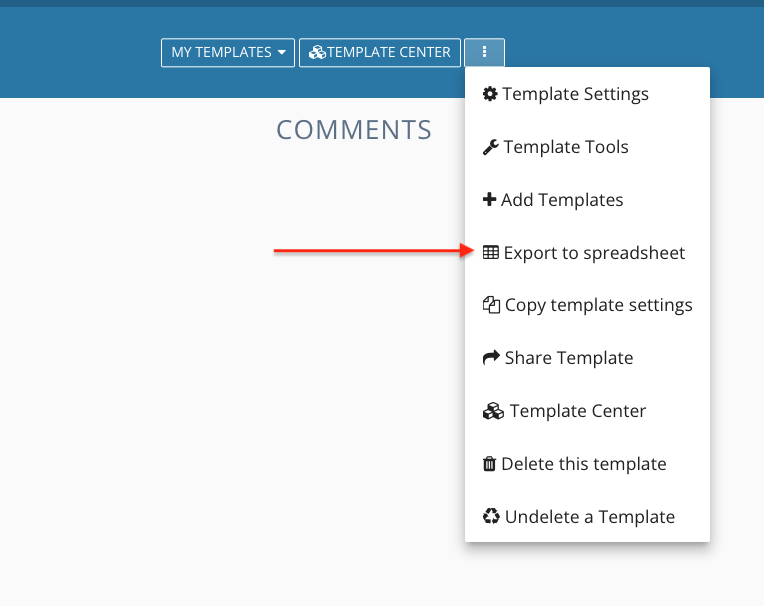
- Click the three dots to the right and select “Export to spreadsheet;
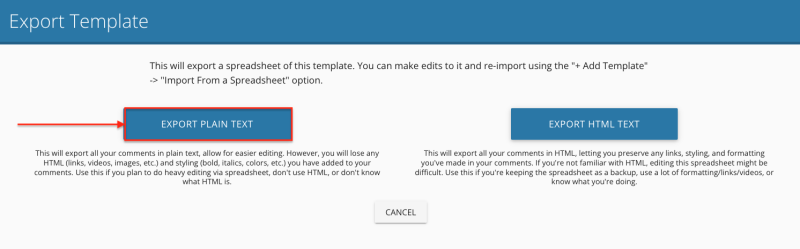
- Select “EXPORT PLAIN TEXT””
- Download the resulting Excel file. This is what ITB will use to imkport the template.
2. 
3. 
If you have any problem with the process, feel free to call me for help 720-646-8724
Note: I don’t provide support by text.